
Embedded systems are at the heart of the digital devices we use every day. From washing machines to cars, from thermostats to medical devices, embedded systems make modern electronics work intelligently and efficiently.
If you’re new to the world of embedded development, this guide will help you understand what embedded systems are, what they’re used for, and how you can get started. Explanations in this article emphasize 8-bit AVR microcontrollers throughout as an easy start for beginners.
What Is an Embedded System?
An embedded system is a combination of hardware and software designed to perform a specific task. Unlike general-purpose computers, embedded systems are built for dedicated functions within larger systems. These systems are typically constrained by performance, memory, power, and cost, and often run real-time operating systems (RTOS) or bare-metal firmware (embedded software).
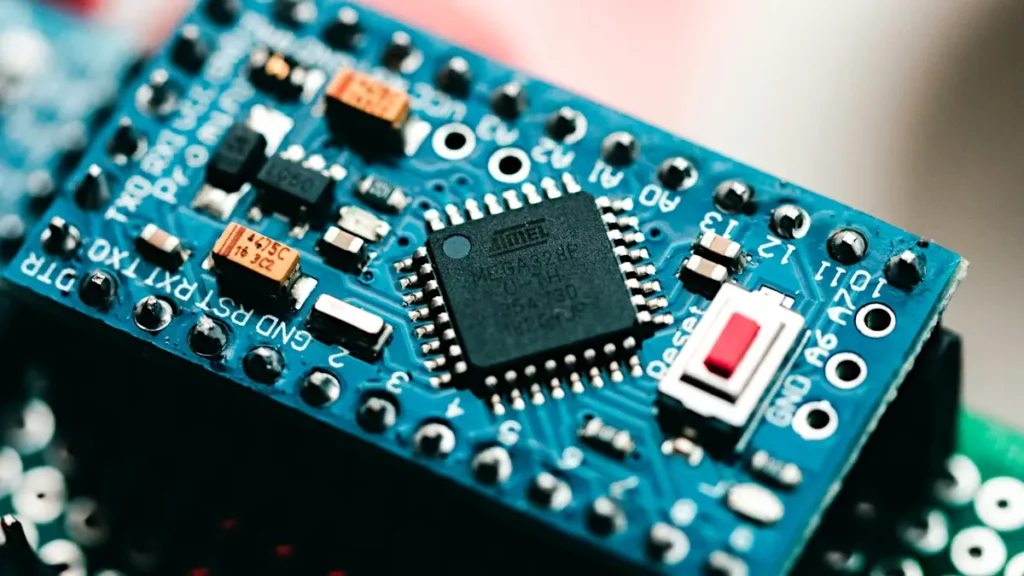
Below is an image of a circuit board with a microcontroller chip that is can be used to prototype and develop an embedded system. Embedded systems in real-world applications typically have their own purpose designed microcontroller boards. For example, a modern electric washing machine has its own dedicated microcontroller board running custom embedded software or firmware. This embedded system connects to the control panel buttons and display of the machine, and controls the washing machine drum speed, water valves and heating element.
Key Characteristics of Embedded Systems
Some of the main characteristics of any embedded system are listed below.
- Dedicated Functionality: Built for one main purpose, for example a USB computer keyboard, the electronic controller in a microwave oven.
- Real-time Operation: Often must respond quickly to external events.
- Resource Constraints: Limited CPU, memory, and power consumption.
- Reliability and Stability: Often expected to run for years without failure.
- Low Power Consumption: Especially in battery-operated or portable devices.
Common Examples of Embedded Systems
There are many embedded systems that are used in day-to-day life. Here are examples of just some of them.
- The electronic controller in a microwave oven is an embedded system
- The electronic control circuit in a modern washing machine
- Digital cameras
- Smart TVs
- Automotive ECUs (Electronic Control Units)
- Medical devices like pacemakers
- Routers and network switches
- Industrial automation controllers
- Smart thermostats
- Medical monitoring devices
At the core of most embedded systems is an embedded computer or microcontroller, which executes the code that controls the system.

Embedded Systems vs General Computers
While both embedded systems and general-purpose computers contain processors and memory, they serve very different roles. An embedded system is designed to perform a specific task or set of tasks within a larger device, often with limited resources and minimal user interaction.
In contrast, general computers like desktops and laptops are built to run a wide range of applications and provide full user interfaces. Understanding the differences between these two types of computing platforms is key to grasping the role of embedded systems in the modern world.
The following table compares some of the features of embedded systems with that of general-purpose computers.
| Feature | Embedded System | General-Purpose Computer |
|---|---|---|
| Purpose | Specific tasks | Multiple applications |
| Size | Small | Larger |
| Resources | Limited RAM/CPU | More RAM/CPU |
| User Interaction | Minimal or none | Full user interface |
| Example | AVR-based temperature sensor | Laptop computer |
Components of an Embedded System
An embedded system usually includes:
- A Microcontroller or Single Board Computer (SBC) – The processing unit
- Memory (RAM and ROM) – For data and code storage
- Input/Output Interfaces – For sensors, buttons, displays, etc.
- Embedded Software – The firmware that runs on the microcontroller
Some advanced embedded systems use single board computers like the Raspberry Pi, while many use microcontrollers like AVR chips due to their simplicity and low power usage.
Who Works with Embedded Systems?
A wide range of professionals work in the field of embedded systems, each with a specific role in designing, building, and maintaining these specialized devices. You’ll often hear terms like embedded engineer, embedded systems engineer, or embedded software engineer. Each of these focus on different aspects of the system.
For example, an embedded software engineer typically writes the embedded software that runs on microcontrollers or embedded computers, often using embedded C programming to interact closely with the hardware. Meanwhile, an embedded developer may handle both the hardware and software side of things, taking a project from concept to completion. On the other hand, an embedded hardware engineer may specialize in embedded hardware development only, designing of microcontroller and electronics circuits and circuit boards.
Across all these roles, responsibilities often include embedded software development, embedded programming, system-level integration, and ensuring smooth communication between hardware and software components.
Embedded Software and Embedded Programming
Embedded systems are powered by software known as firmware. Firmware is often written in low-level languages like C or C++ to give developers fine-grained control over the hardware.
What is Embedded Software?
Embedded software is the specialized program code that runs on an embedded computer or microcontroller. It interfaces with hardware directly and often must meet strict timing and reliability constraints.
Embedded Programming Languages
- Embedded C: The C programming language is the most widely used language in embedded development. It offers direct access to hardware registers and is ideal for writing compact, efficient code.
- Assembly Language: Used when utmost performance and size optimization are required.
- C++: Increasingly popular for larger embedded systems with more complex needs.
Bare-Metal Embedded System Programming
One of the simplest ways to program an embedded system is with bare-metal programming. In a bare-metal embedded system, the firmware runs directly on the microcontroller without an operating system or real-time operating system managing the program.
Bare-metal programming is particularly common in small embedded systems based on microcontrollers such as 8-bit AVR microcontrollers. Because these devices have relatively limited memory and processing resources, a complete operating system is often unnecessary. Instead, the firmware can directly control the microcontroller’s hardware and peripherals.
This makes bare-metal programming an excellent way for beginners to learn embedded systems because it exposes the relationship between the software and the hardware.
What Does Bare-Metal Mean?
The term “bare metal” refers to programming a computer system with little or no software layer between the application code and the hardware.
The C program can configure and control hardware features such as GPIO pins, timers, ADCs, interrupts, and communication peripherals directly through the microcontroller’s registers and peripheral interfaces. There is no general-purpose operating system between the application and the microcontroller.
This differs from a system running an operating system, where application software normally communicates with hardware through operating-system services and device drivers.
How Bare-Metal AVR Programming Works
An 8-bit AVR microcontroller can execute a program stored in its program memory. When the microcontroller starts, the firmware initializes the hardware and then executes the program.
A very simple embedded program might perform the following sequence:
- Configure a GPIO pin as an output.
- Set the pin high to turn an attached LED on.
- Wait for a period of time.
- Set the pin low to turn the LED off.
- Wait again.
- Repeat the process from step 2.
The program can therefore directly control an electronic circuit without requiring an operating system.
This basic structure is sometimes called a main loop or control loop. More sophisticated firmware can use interrupts and timers to respond to events without continuously polling every input. Polling means continually checking an input to see if it has changed.
Bare-Metal Programming and Microcontroller Registers
One of the important characteristics of bare-metal programming is the ability to interact directly with the microcontroller’s hardware registers.
Registers are special locations associated with the microcontroller’s CPU and peripherals. Software can write values to registers to configure hardware and read values from registers to determine the state of hardware.
For example, an AVR program can configure a GPIO port as an input or output and then read or change the state of individual pins.
This direct hardware access is one reason C is so widely used for embedded programming. C provides a relatively efficient way to manipulate hardware while still providing the structured programming features of a high-level language.
The exact registers and their functions depend on the particular AVR microcontroller. Consequently, developers need to consult the device’s datasheet and documentation when writing bare-metal firmware.
Bare-Metal Programming and Interrupts
Bare-metal firmware does not have to rely entirely on a continuously running main loop. Microcontrollers can also use interrupts to respond to events.
An interrupt temporarily changes the normal flow of program execution when a particular event occurs. For example, an interrupt might be generated when:
- A timer reaches a specified value
- A digital input changes state
- A serial communication event occurs
- An ADC conversion completes
The microcontroller can execute a small piece of code called an interrupt service routine (ISR) to handle the event before returning to the main program. This provides a way to build responsive embedded systems without requiring an operating system.
Advantages of Bare-Metal Programming
Bare-metal programming has several advantages, particularly for small microcontroller-based embedded systems.
Simplicity: There is no operating system to configure and manage, which can make a small application relatively straightforward.
Low resource requirements: An RTOS or other operating system requires memory and processing resources. Bare-metal firmware can use the microcontroller’s resources primarily for the application itself.
Direct hardware control: Firmware can interact closely with the microcontroller’s registers and peripherals.
Predictable operation: With no operating system scheduling multiple application tasks, the developer has direct control over when the firmware performs its operations.
Low cost: Small microcontrollers can be used without requiring the additional memory and processing capability that a more complex software platform might need.
Good for learning: Bare-metal programming provides a practical way to understand how software controls hardware.
Limitations of Bare-Metal Programming
Bare-metal programming also becomes more difficult as an embedded system grows in complexity.
A simple program with one main loop may be easy to understand. However, a larger system might need to handle many tasks simultaneously, such as reading sensors, controlling motors, communicating over a network, updating a display, processing user input, and responding to time-critical events. Managing all these activities manually can make the firmware increasingly complicated.
Developers may need to create their own task scheduling, timing, communication, and synchronization mechanisms. Interrupts must also be carefully designed because poorly implemented interrupt routines can cause timing problems or interfere with other parts of the firmware.
For larger systems, an RTOS can provide software services that make it easier to organize and manage multiple tasks.
Bare Metal vs. an RTOS
The main difference is that bare-metal firmware runs directly on the microcontroller, while an RTOS (Real-Time Operating System) provides a software layer that manages tasks and other system resources.
An RTOS can provide features such as task scheduling, task priorities, synchronization, inter-task communication, and timing services. These features can make complex embedded applications easier to organize.
However, using an RTOS also introduces additional software complexity and consumes system resources. For a small AVR application, the additional overhead may not be necessary.
When Should Bare-Metal Programming Be Used?
Bare-metal programming is often a good choice when the embedded application is relatively small and can be managed with a main loop, interrupts, and the microcontroller’s built-in peripherals.
Examples include:
- LED controllers
- Simple temperature sensors
- Digital clocks
- Small electronic instruments
- Basic motor controllers
- Simple battery-powered devices
- Small automation controllers
- Educational and hobby projects
As the number of functions and software tasks increases, an RTOS may become more useful.
For someone learning embedded systems, bare-metal programming is also an excellent starting point. It allows the programmer to learn how the CPU, memory, GPIO, timers, interrupts, and other peripherals work before introducing the additional concepts associated with an operating system.
Bare-Metal Programming as a Foundation for Embedded Development
Learning bare-metal programming provides a strong foundation for understanding more advanced embedded software architectures.
When working directly with an 8-bit AVR microcontroller, a beginner can learn how a program is started, how hardware is initialized, how inputs are read, how outputs are controlled, and how interrupts and timers affect program execution.
Once these concepts are understood, it becomes much easier to understand why an RTOS is useful in a more complex system and what additional functionality it provides.
For small embedded systems, bare-metal programming can be all that is required. For larger systems, an RTOS can provide a structured way to manage multiple software tasks. Both approaches are important parts of embedded development, but bare-metal programming is generally the simpler place to begin.
Real-Time Operating Systems (RTOS)
As an embedded system becomes more complex, managing all of its functions with bare-metal firmware can become increasingly difficult. An RTOS (Real-Time Operating System) provides a structured way to manage multiple software tasks and can make complex embedded applications easier to develop and maintain.
An RTOS is designed specifically for systems where the timing of operations can be important. Instead of putting all of the application code into one main loop, the developer can divide the program into separate tasks. The RTOS then manages when these tasks run and can give higher-priority tasks access to the processor when necessary.
For example, an embedded system might have separate tasks for reading sensors, processing data, communicating with another device, and updating a display. The RTOS can manage these tasks while providing mechanisms for them to communicate and share resources.
How an RTOS Works
An RTOS typically contains a scheduler that determines which task should run at any particular time. Tasks can have different priorities, allowing time-critical operations to receive processor time when they need it.
The RTOS can also provide services for timing, communication, and synchronization between tasks. For example, one task might collect data from a sensor and place it in a shared queue, while another task processes that data.
This provides a more organized structure than trying to manage many independent activities manually within a single bare-metal program.
Benefits of Using an RTOS
An RTOS can provide several advantages for more complex embedded systems:
- Task scheduling: The RTOS manages when individual tasks execute.
- Task prioritization: Important or time-critical tasks can be given higher priority.
- Multitasking: Multiple activities can be managed within the same application.
- Inter-task communication: Tasks can exchange information using mechanisms such as queues and message passing.
- Synchronization: Tools such as mutexes and semaphores can help coordinate access to shared resources.
- Timing management: Tasks can be delayed or scheduled at specific intervals.
- Modular software design: Dividing an application into separate tasks can make larger programs easier to understand and maintain.
What Does “Real-Time” Mean?
The term real-time does not simply mean that a system operates quickly. It means that the system is designed to respond to events within defined timing requirements.
For example, an embedded controller may need to respond to an input within a specified period. An RTOS can help manage these timing requirements by controlling task priorities and scheduling.
A real-time system can be either hard real-time or soft real-time. In a hard real-time system, missing a timing deadline can cause a serious system failure. In a soft real-time system, occasional delays may be acceptable, although the system should normally respond within the required time.
When Is an RTOS Useful?
An RTOS is generally more useful when an embedded application contains several independent tasks that need to operate concurrently or have different timing requirements.
A simple AVR project that reads a button and controls an LED may not need an RTOS. A more complex embedded system that simultaneously manages multiple sensors, communications, user inputs, displays, and control functions may benefit from the structure provided by an RTOS.
Using an RTOS also introduces additional software complexity and requires memory and processing resources. For this reason, an RTOS is not automatically better than bare-metal programming. The choice depends on the requirements of the embedded system.
Popular RTOS Examples
Several RTOS platforms are used in embedded development, including:
For beginners working with small microcontrollers, understanding bare-metal programming first provides a useful foundation before moving on to RTOS-based development. Once the concepts of tasks, interrupts, timers, and hardware control are understood, an RTOS can be seen as an additional layer that helps organize and manage a more complex embedded application.
An RTOS manages multiple tasks and handles scheduling, inter-task communication, and timing constraints. While many small systems run on bare-metal firmware without an OS, larger embedded systems often use an RTOS to manage complexity.
Debugging Embedded Systems
Debugging is performed by embedded software developers on embedded code. It is the act of searching for and finding ‘bugs’ or errors in the embedded program code, and correcting or fixing these errors.
Where do software bugs come from? Errors or bugs are unintentionally added to the software or code during the software development process, by the embedded software developer. This is an unfortunate, although expected occurrence, that is a part of any software development, be it embedded software development, or any other software development, such as for the web, smart phones or computers.
Debugging embedded systems can be challenging due to their limited resources, complex hardware interactions, and the fact that they often operate in real-time environments. However, effective debugging is crucial for ensuring the reliability and performance of embedded applications. Below are some common methods and tools used for debugging embedded systems:
1. In-Circuit Debugger (ICD) or In-Circuit Emulator (ICE)
In-circuit debuggers are hardware tools that interface with the embedded system’s microcontroller or processor to allow real-time debugging. These debuggers can stop the execution of the program, inspect variables, step through code line by line, and modify memory contents. Popular ICDs include the Segger J-Link and Microchip’s MPLAB ICD. These tools are vital for identifying issues in the system’s operation, such as incorrect memory access, faulty interrupts, or timing problems.
2. Serial Debugging
Serial debugging involves using serial communication (such as UART or USB) to send debug messages to a host computer. These messages may include variable values, error codes, or general system status, which help developers understand what’s happening inside the embedded system during runtime. Although it doesn’t allow for stepping through code, serial debugging is useful in embedded systems with limited resources where more complex debugging tools cannot be used.
3. JTAG Debugging
Joint Test Action Group (JTAG) is a standard for debugging and testing embedded systems. It provides access to the processor’s internal registers and memory, enabling developers to inspect system state and control execution. JTAG allows for both low-level hardware debugging and high-level software debugging, making it an essential tool for identifying issues that might not be apparent in software alone.
4. Real-Time Operating System (RTOS) Tracing
For embedded systems running an RTOS, using real-time tracing can help identify performance issues such as missed deadlines or inefficient task scheduling. Tracing tools monitor task execution and events, recording timestamps and allowing developers to visualize how tasks are executed and where potential bottlenecks occur. RTOS-based debuggers like FreeRTOS’s Tracealyzer and embOS’s embOSView offer graphical representations of task execution, helping to pinpoint problems.
5. Simulation and Emulation
Simulators and emulators allow developers to run embedded software on a virtual platform before deploying it to actual hardware. This approach can be particularly useful for debugging complex algorithms or checking system behavior without requiring access to the physical device. Tools like QEMU and Renode are popular choices for simulating embedded systems. While emulation is slower than running code on actual hardware, it can help catch errors early in the development cycle.
6. Logic Analyzers and Oscilloscopes
Logic analyzers and oscilloscopes are used to observe the electrical signals in an embedded system. By analyzing signal waveforms, developers can identify issues related to timing, voltage levels, or signal integrity. These tools are essential when debugging problems that are hard to catch through software debugging alone, such as signal collisions or communication errors between peripherals.

7. Watchdog Timers
Watchdog timers are hardware components that automatically reset the embedded system if it stops responding or gets stuck in an infinite loop. By integrating a watchdog timer into the system, developers can ensure that the system recovers from failures, especially in safety-critical applications. While not a debugging tool per se, it can help prevent failures from causing prolonged system downtime, providing valuable time for further debugging. Many modern microcontrollers have built in watch dog timers, so do not need an external watchdog timer circuit.
8. Static and Dynamic Analysis
Static analysis tools scan the source code before execution to identify potential issues such as memory leaks, uninitialized variables, or unused functions. These tools provide insight into code quality and potential runtime problems. This makes them an essential part of the debugging process. Dynamic analysis, on the other hand, examines the system during runtime. It focuses on memory usage, thread synchronization, and error handling.
9. Embedded System Debugging Best Practices
- Start Simple: Begin by focusing on simple debugging methods like print statements or serial communication. Once the basic functionality is confirmed, move on to more advanced debugging tools.
- Isolate Components: If debugging a complex system, try isolating individual components (e.g., sensors or communication modules) to narrow down the source of the issue.
- Use Assertions: Incorporate assertions into your code to check assumptions and catch errors during development.
- Automated Testing: Automating tests can help catch errors early in the development cycle and ensure the system behaves as expected after each update.
By employing a combination of the above methods and tools, embedded system developers can efficiently identify and resolve bugs, leading to more reliable and stable systems.
Tracing in Embedded Systems
Tracing is a powerful debugging and performance analysis technique supported by many RTOSes. It allows developers to record system events over time and analyze how tasks interact, how resources are used, and where bottlenecks occur.
Types of Tracing
- Software-Based Tracing: No special hardware needed. Uses hooks or macros to record events in memory. May impact CPU and RAM usage.
- Hardware-Based Tracing: Uses specialized tools and interfaces (like SWO, JTAG) to collect real-time data with minimal overhead.
Tracing helps developers understand timing issues, improve performance, and ensure reliable behavior, especially in safety-critical systems.
Reliability in Embedded Systems
Reliability is a top priority in embedded systems. Devices often operate for years without maintenance and sometimes in remote or hazardous environments.
Challenges
Examples of some of the challenges in embedded systems are:
- Inaccessibility for repairs (e.g., satellites, underwater systems)
- Safety-critical roles (e.g., automotive, aviation, medical)
- Financial impact from failure (e.g., telecom, banking infrastructure)
Reliability Techniques
Some techniques that are employed to increase embedded system reliability are:
- Watchdog Timers: Reset the system if software hangs
- Hypervisors: Isolate components to prevent fault propagation
- Trusted Computing Base (TCB): Core components are kept secure and verified
- Immunity-Aware Programming: Following coding standards like MISRA C/C++ to prevent common runtime errors
- Static Analysis Tools: Automatically check code for safety and reliability issues
High vs. Low Volume Embedded Systems
- High Volume: Products like smartphones are optimized for cost and efficiency. Hardware is selected to meet exact needs without overprovisioning.
- Low Volume: Prototypes and industrial systems may use general-purpose computers with embedded software or RTOS for flexibility.
Embedded Software Architecture Types
Embedded systems can be designed using various software architectures based on complexity and responsiveness.
1. Simple Control Loop
A basic loop monitors inputs and updates outputs in sequence. This is ideal for very simple systems. Anyone familiar with Arduino will recognize the loop() function in the Arduino software as a simple control loop.
2. Interrupt-Controlled Systems
Event-driven design where tasks are triggered by interrupts. Fast and efficient for real-time responses. Microcontrollers typically have built-in interrupt systems that can be enabled and used in software.
3. Cooperative Multitasking
Each task voluntarily yields control to others. Easy to implement but requires careful task design.
4. Preemptive Multitasking
Tasks are scheduled by an RTOS (real-time operating system) using timers and interrupts. Allows for complex, parallel task execution with synchronization mechanisms like semaphores and message queues.
Embedded Kernels: Types and Tradeoffs
Microkernels
Minimalist kernel that handles only essential functions like task switching. More secure but more complex to develop for.
Exokernels
Give applications near-direct access to hardware via minimal abstraction layers. Extremely flexible but rare in commercial use.
Monolithic Kernels
Large, feature-rich kernels that include many services like networking and file systems. Examples: Embedded Linux, VxWorks, Windows CE.
Monolithic kernels are increasingly popular in high-end embedded devices like routers, GPS units, and multimedia players.
Additional Software Components in Embedded Systems
Many embedded systems integrate higher-level components depending on their functionality:
- Network Protocols: TCP/IP, CAN, MQTT, HTTP, FTP
- Storage: FAT filesystem, flash memory managers
- Audio/Video Codecs: For multimedia applications
- Security: TLS/SSL libraries, secure boot, encryption engines
Domain-Specific Architectures
Some industries standardize embedded system architectures:
- AUTOSAR (Automotive Open System Architecture): Widely used in automotive software to standardize communication, diagnostics, and safety.
- IoT Frameworks: Such as ARM mbed OS or Amazon FreeRTOS for connected devices.
Single Board Computers (SBCs) in Embedded Systems
A Single Board Computer (SBC) is a complete computer built on a single circuit board. Popular examples include the Raspberry Pi, BeagleBone, and Arduino (which is more of a microcontroller board).
SBCs are often used for:
- Prototyping
- Low-cost production units
- Educational and hobbyist projects
Microcontroller manufacturers typically have their own evaluation boards that developers buy and are used to get familiar with a particular microcontroller, or microcontroller family. There are many AVR Evaluation Board examples, from Microchip and other vendors.
Careers in Embedded Systems
If you’re interested in this field, here are some related roles:
- Embedded Software Engineer: Specializes in the development of embedded software, but must have an understanding of the hardware that the software is being developed for.
- Embedded Systems Engineer: Usually more concerned with the architecture of embedded systems. Must have an understanding of the hardware and software of the system, and a good knowledge of embedded system development in general.
- Embedded Developer: Typically develops both hardware and software.
- Firmware Engineer: Another name for an embedded software engineer.
- Embedded Hardware Developer: Specializes in hardware development and electronics.
Skills in Embedded C, RTOS, device drivers, and debugging tools are especially valuable. Understanding microcontrollers, hardware interfaces (UART, SPI, I2C), and low-level system behavior is also key.
Embedded Systems Using 8-Bit AVR Microcontrollers
Now that you understand the basics, let’s explore how 8-bit AVR microcontrollers from Microchip fit into the world of embedded systems. These microcontrollers are ideal for beginners and hobbyists due to their simplicity, affordability, and robust community support.
Why AVR Microcontrollers Are Still Relevant in Embedded Systems
When talking about embedded systems, especially from a hobbyist or educational perspective, it’s hard not to mention AVR microcontrollers. These chips have powered countless projects for decades, thanks to their simplicity, affordability, and accessibility.
Originally developed by Atmel in the 1990s and now part of Microchip Technology, the AVR family of microcontrollers helped shape the embedded development landscape. If you’re new to AVR, be sure to check out our beginner’s guide to 8-bit AVR microcontrollers for a full introduction to these devices and some of the available programming environments for them.
What Can You Build with AVR Microcontrollers?
8-bit AVR chips are used in a wide range of embedded development projects. Hobbyists often use them in home automation systems, like motion-sensing lights or smart thermostats. They’re also ideal for building DIY gadgets such as digital clocks, LED light controllers, and USB game controllers.
In the world of education, AVR-based development boards are widely used to teach students the fundamentals of embedded programming and embedded C, often through platforms like Arduino. Beyond the classroom, you’ll find AVR chips in real-world products like electronic door locks, small-scale robotics, temperature sensors, and handheld test instruments.
The Role of Embedded C in AVR Projects
Most AVR projects are programmed in the C programming language. Embedded C programming gives developers precise control over hardware without the overhead of high-level frameworks. It’s one of the key skills for any aspiring embedded systems engineer or embedded software engineer.
Why Choose AVR for Your Next Embedded Project?
While more powerful 32-bit microcontrollers and single board computers (like the Raspberry Pi) are available, 8-bit AVR chips are still a smart choice for many projects. Their low power consumption, robust documentation, and active community make them ideal for learning and prototyping. Whether you’re an electronics hobbyist, a student, or a budding embedded developer, AVR microcontrollers offer a solid foundation for your embedded systems journey.
Frequently Asked Questions About Embedded Systems
What is an embedded system?
An embedded system is a combination of hardware and software designed to perform a specific task or set of tasks. Unlike a general-purpose computer, an embedded system is usually built into a larger device and is designed for a particular purpose. Examples include washing machines, thermostats, automotive control units, medical devices, and industrial controllers.
What is the difference between an embedded system and a computer?
A general-purpose computer is designed to run many different applications and provide a broad range of functions. An embedded system is designed for a specific purpose and often has limited processing power, memory, and power consumption. An embedded system may also have little or no direct user interaction.
What is a microcontroller?
A microcontroller is a small computer contained in a single integrated circuit. It typically includes a processor, memory, and input/output interfaces. In an embedded system, the microcontroller executes the firmware that controls the operation of the device and communicates with sensors, switches, displays, and other hardware.
What is firmware in an embedded system?
Firmware is the software stored on and executed by an embedded computer or microcontroller. It controls how the hardware operates and typically interacts directly with the microcontroller’s peripherals and input/output connections. Firmware is commonly written in languages such as C, C++, or assembly language.
What programming language is used for embedded systems?
C is one of the most widely used programming languages for embedded systems because it provides relatively low-level access to hardware while allowing developers to write structured and efficient programs. C++ is also widely used, particularly in more complex systems, while assembly language may be used when very low-level control, performance, or code-size optimization is required.
Why is C commonly used with 8-bit AVR microcontrollers?
C is well suited to 8-bit AVR microcontrollers because it allows software to interact closely with the hardware while producing relatively compact and efficient code. It is also widely used in embedded development, making knowledge of C a useful skill for anyone learning embedded programming and working with microcontrollers.
Are 8-bit AVR microcontrollers still useful?
Yes. Although more powerful 32-bit microcontrollers and single board computers are available, 8-bit AVR microcontrollers remain useful for many applications, particularly where a relatively simple, low-cost, low-power solution is appropriate. They are also useful for education, prototyping, and learning the fundamentals of embedded programming.
What can you build with an 8-bit AVR microcontroller?
8-bit AVR microcontrollers can be used in a wide variety of projects, including LED controllers, digital clocks, temperature sensors, electronic door locks, small robotics projects, home automation systems, and handheld test instruments. They are also commonly used for educational projects that teach electronics and embedded C programming.
Is Arduino an embedded system?
Arduino is primarily a family of development boards and software tools based on microcontrollers. An Arduino board itself is a microcontroller development platform rather than a complete embedded system in the same sense as a finished product such as a washing machine controller. However, an Arduino board can be used to develop and prototype embedded systems, and Arduino-based hardware can form part of an embedded system.
What is an RTOS?
An RTOS, or real-time operating system, is an operating system designed to manage tasks where timing and responsiveness are important. It can provide task scheduling, inter-task communication, synchronization, and predictable responses to events. Small embedded systems can often operate without an RTOS using bare-metal firmware, while more complex systems may benefit from one.
Do all embedded systems use an RTOS?
No. Many small embedded systems run directly on firmware without an operating system. This approach is often called bare-metal programming. More complex embedded systems may use an RTOS when they need to manage multiple tasks, timing requirements, and communication between different parts of the software.
What is an interrupt in an embedded system?
An interrupt allows a microcontroller to respond to an event without continuously checking for that event in the main program loop. For example, an interrupt can be generated when a timer reaches a particular value or when an external input changes. The microcontroller can temporarily interrupt its normal program execution, handle the event, and then continue with the main program.
How are embedded systems debugged?
Embedded systems can be debugged using several techniques. These include serial debugging, in-circuit debugging, JTAG, simulation and emulation, logic analyzers, and oscilloscopes. Watchdog timers can also help a system recover when software becomes unresponsive. The appropriate debugging method depends on the hardware, software, and type of problem being investigated.
What is a watchdog timer?
A watchdog timer is a hardware feature that can reset a microcontroller if the software stops responding correctly. The firmware periodically resets the watchdog timer during normal operation. If the software becomes stuck, the watchdog is no longer reset and eventually causes the system to restart. Many modern microcontrollers include a built-in watchdog timer.
Why is reliability important in embedded systems?
Embedded systems often operate continuously for long periods and may be difficult or expensive to repair. Some are also used in safety-critical applications such as automotive, aviation, and medical systems. Techniques such as watchdog timers, static analysis, appropriate coding practices, and thorough testing can help improve reliability.
What is the difference between an 8-bit AVR microcontroller and a single board computer?
An 8-bit AVR microcontroller is an integrated device designed for controlling hardware and running relatively small embedded programs. A single board computer, such as a Raspberry Pi, is a more complete computer system with considerably greater processing and memory resources. Microcontrollers are often better suited to simple, dedicated control tasks, while single board computers can handle more complex applications and operating systems.
Is an 8-bit AVR microcontroller a good choice for learning embedded systems?
Yes. 8-bit AVR microcontrollers provide a relatively straightforward way to learn the fundamental concepts of embedded systems. They allow beginners to work directly with microcontroller hardware, input/output, timers, interrupts, and embedded C programming without the complexity of a more powerful computer platform. This makes AVR a useful starting point for understanding how hardware and software work together in an embedded system.
Final Thoughts on AVR Microcontrollers and the World of Embedded Systems
Embedded systems are everywhere, and learning how to work with them opens up a world of possibilities in both hobby electronics and professional engineering. Starting with 8-bit AVR microcontrollers is an excellent path into this field. Whether you’re aspiring to become an embedded software engineer or just exploring your first project, avr8.com is here to guide you step by step.