
When working with 8-bit AVR microcontrollers, choosing the right programmer is essential. Whether you’re a beginner learning the ropes or a seasoned embedded developer, understanding the AVR programmers available to program these chips can save you hours of frustration and debugging.
Over the years, Atmel (now Microchip) has produced several official AVR programmers. Some, like the AVR Dragon and AVRISP mkII, are now discontinued or hard to find. Others have been replaced with modern solutions like the PICkit 5, which supports both PIC and AVR microcontrollers.
You’ll also find a wide variety of clones and affordable alternatives on the market. For example, the popular USBasp, which caters to hobbyists and makers on a budget. In this guide, we walk you through the types of programmers available, the protocols they support, and which AVR microcontrollers they work with.
AVR Programming Protocols and Microcontroller Families
Before diving into the programmers themselves, it’s important to understand the different types of 8-bit AVR microcontrollers and the programming methods they use. These are covered below.
AVR ISP (In-System Programming)
This is the traditional programming protocol used for older AVRs like the ATmega328P and ATtiny85. It uses a 6-pin (or sometimes 10-pin) interface and is supported by most classic tools, including the AVRISP mkII, USBasp, and Arduino ISP.
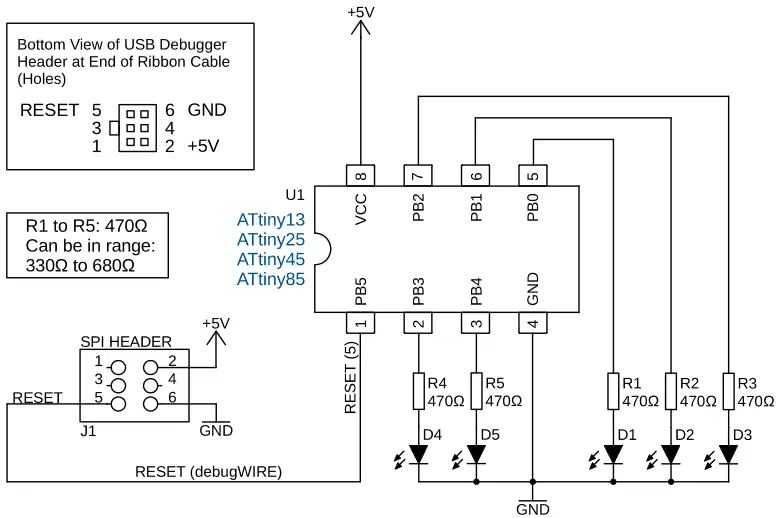
The following diagram shows the ISP SPI programming connections to ATtiny13, ATtiny25, ATtiny45 and ATtiny85 microcontrollers. As can be seen in the diagram, four of the microcontroller pins are used by AVR programmers using this programming interface.

debugWIRE
Certain AVR microcontrollers, such as the ATtiny85 and ATmega328P, support debugWIRE (in addition to ISP), a protocol used for debugging over a single wire. It shares the RESET line, which limits some use cases but allows basic debugging via tools like the Atmel-ICE.
In AVR microcontrollers that support debugWIRE, debugWIRE is switched off by default. The usual procedure is to connect to the device using the AVR ISP interface. After this, the DWEN (debugWire Enable) fuse in the microcontroller is used to enable the debugWIRE interface.
The following diagram shows the debugWIRE interface to 8-pin ATtiny microcontrollers including the ATtiny25, ATtiny45 and ATtiny85. The AVR programmer used in this interface must have debugWIRE capabilities. Note that the ATtiny13 does not have the debugWIRE interface available.
JTAG Support on AVR Microcontrollers
Some higher-end ATmega and XMEGA microcontrollers include support for the JTAG (Joint Test Action Group) interface. While less common in hobbyist setups, JTAG is widely used in professional environments for in-system programming, boundary scan testing, and full-featured debugging.
JTAG can be used with official tools like the Atmel-ICE or AVR Dragon, which support both JTAG and other interfaces like ISP, UPDI, and debugWIRE. JTAG requires four lines (TDI, TDO, TMS, and TCK), and it provides more powerful debugging capabilities than debugWIRE or UPDI, making it a great choice when working with complex applications or RTOS-based systems.
Although not as widely used in modern 8-bit development (with UPDI becoming the new standard), JTAG is still relevant for those maintaining or developing on older hardware platforms where it’s available.
TPI (Tiny Programming Interface)
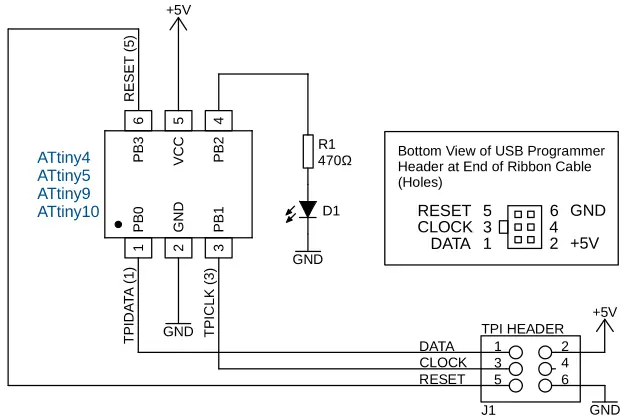
Used in very small devices like the ATtiny10, TPI is a minimal protocol designed for low-pin-count microcontrollers. It is a ‘program only’ interface that does not have debugging capabilities.
In the following image, the TPI interface is shown. It uses three of the microcontroller pins to connect to the AVR TPI programmer. In addition to the three microcontroller pins, Vcc and GND also connect to the programmer.
UPDI (Unified Program and Debug Interface)
New AVR microcontrollers from the ATtiny 0/1/2 series, ATmega 0 series, and AVR Dx / AVRxx Series now use the UPDI protocol. It’s a single-pin interface that replaces ISP and debugWIRE. To use this protocol, you’ll need a UPDI programmer like the official Atmel-ICE, MPLAB SNAP, or a DIY UPDI adapter based on an FTDI or CH340 USB-to-serial converter.
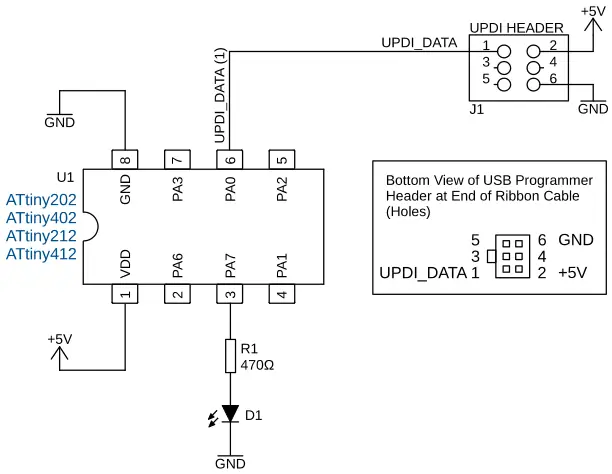
The following diagram shows the UPDI interface connected to 8-pin AVR microcontrollers. This example circuit shows the UPDI interface on the ATtiny202, ATtiny402, ATtiny212, and ATtiny412 AVR microcontrollers. An UPDI AVR programmer connects to a single pin of an AVR microcontroller, as well as to Vcc and GND of the circuit.
Types of AVR Programmers
Let’s go over the various AVR programmers available, from official tools to budget-friendly clones and DIY options.
1. Modern AVR Programmers
Modern AVR programmers are designed to support the latest 8-bit AVR microcontrollers using newer programming protocols like UPDI. Unlike older tools limited to AVR ISP or debugWIRE, these modern programmers (developed by Microchip) offer broader compatibility, faster programming, and better integration with actively maintained tools like MPLAB X IDE.
Whether you’re working with legacy ATmega chips or newer AVR Dx series devices, using a reliable modern programmer ensures a smoother development experience.
PICkit 5
Modern AVR programmers have evolved to support both legacy and next-generation 8-bit AVR microcontrollers. A great example is the PICkit 5, a dual-purpose programmer and debugger designed by Microchip to handle both PIC and AVR devices.
Unlike older Atmel programmers, the PICkit 5 is supported in MPLAB X IDE, Microchip’s modern development environment. This makes it a solid choice for embedded developers who want a future-proof tool. It fully supports the UPDI protocol used by new AVR chips and offers faster, more reliable programming than many older or budget tools.
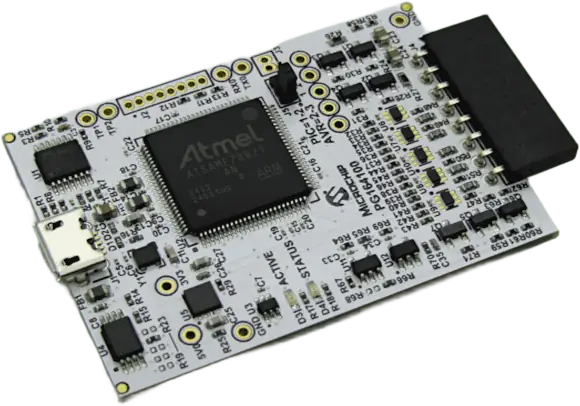
The MPLAB PICkit 5 In-Circuit Debugger is Microchip’s newest USB programmer / debugger at the time of writing. It supports JTAG, SWD, UART VCP, ICSP, and AVR protocols.
- Microchip’s latest all-in-one tool
- Supports both PIC and AVR microcontrollers
- Compatible with MPLAB X
- Ideal for professionals who work across platforms

MPLAB SNAP
The MPLAB Snap In-Circuit Debugger / Programmer is lower cost than the PICkit 5 and supports debugging and programming of PIC, dsPIC, AVR and SAM flash MCUs and MPUs, using the MPLAB X Integrated Development Environment (IDE) version 5.05 or later.
- Affordable official programmer/debugger
- Supports UPDI, ISP, and other interfaces
- Slightly limited compared to the PICkit 5 but great for beginners
2. Official Atmel/Microchip AVR Programmers (Legacy)
Before the Microchip acquisition and the move to newer tools, Atmel programmers were the go-to solution for working with 8-bit AVR microcontrollers. Legacy AVR programmers like the AVRISP mkII, AVR Dragon, and Atmel-ICE offered robust support for protocols such as AVR ISP, debugWIRE, and even JTAG.
These tools were tightly integrated with Atmel Studio, providing debugging and programming features that served both hobbyists and professionals. While many of these programmers are now discontinued or harder to find, they remain valuable for working with older AVRs still in use across countless embedded projects.
Atmel-ICE Programmer and Debugger
The Atmel-ICE programmer / debugger is still available from Microchip. It is a development tool for debugging and programming ARM Cortex-M based SAM and AVR microcontrollers with on-chip debug capability. It supports JTAG, SWD, PDI, TPI, aWire, SPI, debugWIRE and UPDI interfaces
- Supports ISP, UPDI, TPI, and debugWIRE on 8-bit AVR devices
- One of the most versatile tools
- Still available from some suppliers and supported in Microchip Studio
AVR Dragon
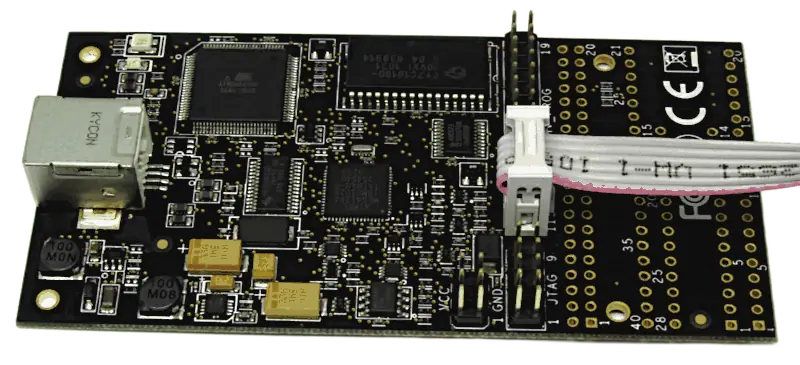
The now obsolete AVR dragon was a low cost development tool for 8-bit and 32-bit AVR devices with On Chip Debug (OCD) capability. It can perform a symbolic debug on all devices with OCD with SPI, JTAG, PDI (selected devices), high voltage serial programming, parallel programming, and aWire modes, and supports debugging using SPI, JTAG, PDI interfaces.
- Supported a wide range of interfaces: ISP, HVPP, HVSP, JTAG, debugWIRE
- Discontinued, but powerful if you can find one second-hand
AVRISP mkII (AVRISP AVR programmers)
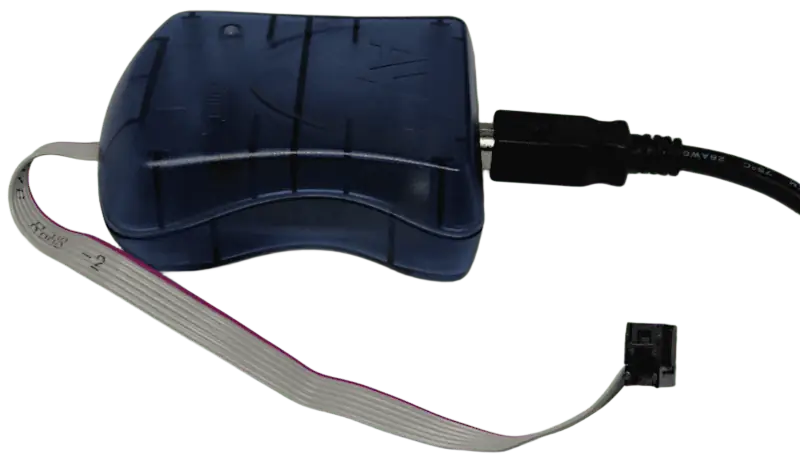
The now obsolete AVRISP MKII was used for field upgrades of 8-bit AVR microcontrollers with ISP or PDI interfaces.
- Classic USB Atmel programmer for AVR ISP
- No longer sold, but widely cloned
- Often recognized as avr isp mk2 or avr avrisp mkii
3. Hobbyist and Clone AVR Programmers
For budget-conscious makers and hobbyists, there’s a wide range of hobbyist and clone AVR programmers available that offer great value for 8-bit AVR development. Popular tools like the USBasp and Arduino ISP are commonly used for basic AVR ISP programming and are supported by tools such as AVRDUDE.
These low-cost alternatives often come as open-source designs or cheap clones and can be used to program a variety of classic AVR chips. While they may lack advanced features like debugging or UPDI support, they’re perfect for simple projects, educational use, and getting started with AVR programmers on a tight budget.
USBasp
- Open-source USB programmer
- Supports AVR ISP programming
- Widely used in the maker community
- Cheap and well supported by tools like AVRDude
- Works with legacy AVRs but not UPDI devices
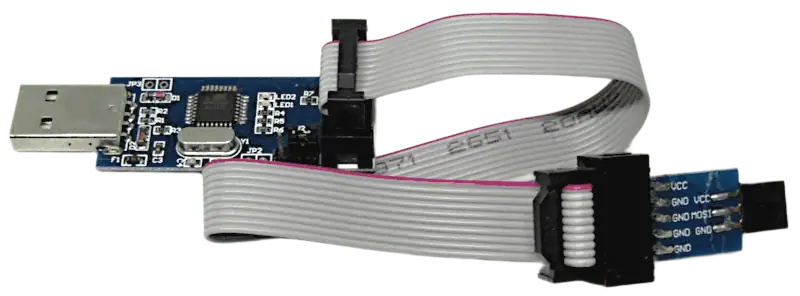
One version of the USBasp is shown below. These AVR programmers come in different forms from different manufacturers, so you may have a USBasp that looks different from the one in the image.
Arduino ISP
Use an Arduino board, such as an Arduino Uno, to program an AVR chip that has the ISP programming interface.
- Uses an Arduino as a programmer
- Great for Arduino ISP programming projects or bootloader burning
- Requires basic wiring and setup but is highly flexible
DIY UPDI AVR Programmer
- Can be built using a USB-to-Serial adapter (like CH340 or FTDI)
- Supports UPDI devices using pymcuprog or jtag2updi firmware
- Inexpensive and reliable for programming new AVRs
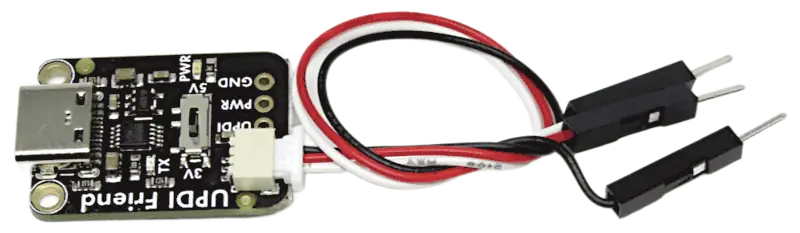
An example of a CH340 UPDI hobby AVR programmer is shown in the image below.
AVR ICSP Programmer / AVR ISP Programmer / AVR ISP USB Programmer / USBtinyISP AVR Programmer
- “AVR ICSP programmer” usually refers to any ISP-compatible tool
- The same programmer may also be referred to as a AVR ISP programmer or AVR ISP USB programmer
- USBtinyISP AVR Programmer refers to a particular variant of a hobby AVR ISP programmer that uses an ATtiny chip in the programmer
- Be careful when buying online as some tools are mislabelled or low-quality clones
As with the USBasp, the USBtinyISP programmer comes in many different forms from many different manufacturers. An example of one of these programmers is shown in the image below.

AVR Programming Software
While choosing a programmer is important, you’ll also need compatible software:
- AVRDude – Command-line tool used with USBasp, Arduino ISP, and more
- Microchip Studio – Official IDE supporting Atmel-ICE and legacy Atmel tools
- MPLAB X IDE – Supports newer tools like PICkit 5 and MPLAB SNAP
- pymcuprog – Python tool supporting modern Microchip programmers and UPDI
Tips for Choosing the Right AVR Programmers
- For classic AVR chips (e.g. ATmega328P): USBasp, USBtinyISP, or Arduino ISP is fine for program only functionality. To debug, use Atmel-ICE, MPLAB SNAP, PICkit5, or AVR Dragon if you have one.
- For new UPDI-based chips (e.g. ATtiny1616): Go for Atmel-ICE, MPLAB SNAP, PICkit5 or a DIY UPDI adapter.
- For professional development: PICkit 5 or Atmel-ICE offer the best features and debugging support.
- On a budget? USBasp and Arduino ISP are great starting points, but remember that you are limited to the older range of AVR microcontrollers, such as the ATmega328 and ATtiny85. For the new range of UPDI programmed devices, get a DIY UPDI programmer.
Frequently Asked Questions About AVR Programmers
What are AVR programmers?
An AVR programmer is a USB hardware device used to transfer a program from a computer to an AVR microcontroller. The programmer connects to the AVR using a programming interface such as ISP, UPDI, TPI, or another supported protocol. The software program or firmware is loaded into the Flash memory of the target AVR microcontroller by the AVR programmer.
Some AVR programmers also provide debugging capabilities, allowing you to run a program step by step, set breakpoints, and inspect the microcontroller while it is running. The programmer you need depends on the AVR microcontroller and the programming interface it supports.
What is the best AVR programmer for beginners?
For beginners working with classic AVR microcontrollers such as the ATmega328P or ATtiny85, an inexpensive USBasp is often a good starting point when you only need programming functionality. An Arduino can also be used as an ISP programmer.
If you are working with newer AVR microcontrollers that use UPDI, a modern programmer such as the MPLAB SNAP or PICkit 5 is a better choice. A DIY UPDI programmer can also be used when keeping costs low is important.
Can I use a USBasp to program an ATmega328P?
Yes. The ATmega328P supports AVR ISP, and USBasp is designed for ISP programming. USBasp programmers are commonly used with software such as AVRDude to upload programs to classic AVR microcontrollers.
You will need to connect the programmer’s ISP signals to the appropriate pins on the ATmega328P, along with VCC and GND as required by your particular setup.
Can I use a USBasp to program an ATtiny85?
Yes. The ATtiny85 supports AVR ISP, so a USBasp can be used to program it. The ISP connection uses the appropriate SPI programming pins together with RESET, VCC, and GND.
A USBasp is therefore a low-cost option for many of the older ATtiny and ATmega devices that use the traditional ISP programming interface.
Can an Arduino be used as an AVR programmer?
Yes. An Arduino board such as an Arduino Uno can be configured to act as an ISP programmer. This allows the Arduino to program another AVR microcontroller that supports ISP.
This approach is particularly useful for educational projects and when you already have an Arduino available. It requires some wiring and software setup, but avoids the need to purchase a separate ISP programmer.
What is the difference between an AVR programmer and an AVR debugger?
An AVR programmer transfers a program into the microcontroller’s memory. A debugger provides additional tools for examining and controlling the program while it is running, in addition to being able to program the target AVR.
Depending on the microcontroller and programmer, debugging can include features such as breakpoints, single-stepping through code, and examining registers and memory. Not every AVR programmer supports debugging, so check both the programmer and the microcontroller’s supported interfaces before buying a tool.
What is AVR ISP?
AVR ISP, or In-System Programming, is a traditional programming interface used by many classic AVR microcontrollers. It typically uses a six-pin connection, although other connector arrangements are possible.
ISP uses SPI-related signals to communicate with the microcontroller and is supported by programmers such as USBasp, AVRISP mkII, and many modern programmers. It is commonly used with devices such as the ATmega328P and ATtiny85.
What is UPDI programming?
UPDI, or Unified Program and Debug Interface, is a programming and debugging interface used by many newer AVR microcontrollers. Unlike traditional ISP, UPDI uses a single data connection between the programmer and the microcontroller, along with power and ground connections.
UPDI is used by newer families including the ATtiny 0/1/2 series, ATmega 0 series, and AVR Dx and AVRxx series. A UPDI-compatible programmer is required to program these devices.
Can I use an old AVR programmer with a new AVR microcontroller?
It depends on the programming interface supported by the microcontroller. Older programmers designed only for AVR ISP cannot generally be used to program newer AVR devices that require UPDI.
For a new AVR that uses UPDI, you need a programmer that supports UPDI, such as the Atmel-ICE, MPLAB SNAP, PICkit 5, or a suitable DIY or hobby UPDI adapter. Always check the programming interface specified for the particular AVR device before selecting a programmer.
Which AVR programmers support UPDI?
Several modern AVR programmers support UPDI, including the Atmel-ICE, MPLAB SNAP, and PICkit 5. DIY UPDI adapters can also be built using suitable USB-to-serial hardware and appropriate firmware.
UPDI is particularly important if you are working with newer AVR devices such as the ATtiny202, ATtiny402, ATtiny1616, or devices in the AVR Dx family.
Can I program AVR microcontrollers with a USB-to-serial adapter?
A USB-to-serial adapter cannot normally be used directly as a traditional AVR ISP programmer. However, suitable USB-to-serial adapters can be used to create a DIY UPDI programmer for AVR microcontrollers that support UPDI.
For example, adapters based on devices such as the CH340 or FTDI chips can be used with suitable UPDI firmware and software. This can provide an inexpensive way to program newer AVR microcontrollers.
What software is used with AVR programmers?
The software depends on the programmer and the programming interface. AVRDude is a widely used command-line programming tool that works with programmers such as USBasp and Arduino ISP.
Microchip’s development tools can be used with official programmers. Microchip Studio supports various Atmel and Microchip programming tools, while MPLAB X IDE supports newer tools such as the PICkit 5 and MPLAB SNAP. The pymcuprog Python tool also supports modern Microchip programming solutions and UPDI devices.
Do AVR programmers provide power to the microcontroller?
Some AVR programmers can supply power to the target circuit, while others may expect the target circuit to have its own power supply. The exact behavior depends on the programmer.
Before connecting a programmer, check its documentation and the voltage requirements of the AVR microcontroller. Do not assume that the programmer will provide the correct supply voltage for every target circuit.
What is debugWIRE on an AVR microcontroller?
debugWIRE is a debugging interface available on certain AVR microcontrollers. It uses a single connection and shares the RESET pin, allowing debugging with compatible programmers and debuggers such as the Atmel-ICE.
On devices that support debugWIRE, the interface is normally disabled by default. It is typically enabled by programming the DWEN fuse through the AVR’s ISP interface. Once enabled, a compatible debugger can communicate with the microcontroller using debugWIRE.
What is TPI programming?
TPI, or Tiny Programming Interface, is a programming interface designed for some very small AVR microcontrollers, including devices such as the ATtiny4, ATtiny5, ATtiny9, and ATtiny10.
TPI uses only a small number of connections and is intended primarily for programming. Unlike some other AVR interfaces, TPI does not provide debugging capabilities.
What is JTAG used for on AVR microcontrollers?
JTAG is an interface used by some higher-end AVR and XMEGA microcontrollers. It can provide programming, debugging, and other capabilities such as boundary scan testing.
JTAG uses several signal lines, including TDI, TDO, TMS, and TCK. Although it is less common on newer 8-bit AVR devices, it remains useful when working with older AVR hardware that supports JTAG.
Are AVR Dragon and AVRISP mkII AVR programmers still available?
The AVR Dragon and AVRISP mkII are discontinued AVR programmers. They can still be found second-hand and may remain useful for older AVR development, but they are not the best choice for starting a new development setup.
Modern programmers such as the Atmel-ICE, MPLAB SNAP, and PICkit 5 provide support for newer programming interfaces and are generally a better choice when working with current AVR microcontrollers.
Should I buy an Atmel-ICE, MPLAB SNAP, or PICkit 5?
The best choice depends on the AVR devices and interfaces you need to support. The Atmel-ICE is a versatile tool with support for several AVR interfaces, including ISP, UPDI, TPI, and debugWIRE. The MPLAB SNAP provides a lower-cost official option with support for AVR and other Microchip devices.
The PICkit 5 is a more modern all-in-one programmer and debugger that supports both PIC and AVR microcontrollers. It is particularly useful if you work with multiple Microchip microcontroller families.
What AVR programmer should I buy for an ATtiny1616?
The ATtiny1616 uses the UPDI programming interface, so you need a UPDI-compatible programmer. Suitable options include the Atmel-ICE, MPLAB SNAP, PICkit 5, or a suitable DIY UPDI programmer.
A traditional USBasp is not the appropriate choice for programming the ATtiny1616 because USBasp is intended for the older AVR ISP interface.
What AVR programmer should I buy for an ATmega328P?
If you only need to program an ATmega328P, an inexpensive USBasp or Arduino ISP setup is usually sufficient because the ATmega328P supports AVR ISP.
If you also want debugging capabilities, a more capable programmer such as the Atmel-ICE, MPLAB SNAP, or PICkit 5 may be a better investment.
Can one AVR programmer work with both old and new AVR microcontrollers?
Some modern programmers support multiple AVR programming interfaces and can therefore work with both older and newer AVR microcontrollers. The Atmel-ICE, for example, supports several interfaces including ISP, TPI, debugWIRE, and UPDI.
However, compatibility depends on the specific AVR device and interface. Always check the programmer’s supported devices and interfaces rather than assuming that a programmer will work with every AVR microcontroller.
Are cheap clone AVR programmers worth buying?
Cheap clones can be useful for hobby projects and learning, particularly when you only need basic programming. USBasp and other inexpensive ISP programmers are widely used for programming classic AVR devices.
However, budget programmers may not provide the same level of support, reliability, or debugging functionality as official tools. For professional development or when working with newer AVR devices, an official programmer can be a worthwhile investment.
How do I choose the right AVR programmer?
Start by identifying the exact AVR microcontroller you want to program and the programming interface it uses. Classic devices such as the ATmega328P and ATtiny85 commonly use ISP, while newer devices such as those in the ATtiny 0/1/2 and ATmega 0 families commonly use UPDI.
Next, decide whether you only need programming or also require debugging. A USBasp may be sufficient for basic ISP programming, while a tool such as the Atmel-ICE or PICkit 5 is more appropriate when you need broader interface support and debugging capabilities.
Final Thoughts on AVR Programmers
Whether you’re flashing bootloaders with an Arduino, experimenting with new UPDI chips, or building commercial-grade devices, there’s an AVR programmer that fits your needs. From the robust Atmel-ICE to the budget-friendly USBasp, the ecosystem around AVR programming continues to evolve with both official and community-driven solutions.
By understanding the programming protocols, tool options, and microcontroller families, you’ll be better equipped to start building, debugging, and optimizing your embedded systems.
You may also be interested in our 8-bit AVR microcontrollers for beginners article and our beginner’s guide to embedded systems.