
In embedded systems, a push button or mechanical switch may seem like the simplest of input devices. But under the hood, there’s a common challenge known as switch bounce, rapid, unintended signal changes caused by the mechanical nature of switches. Without proper switch debounce, these false triggers can confuse digital systems and lead to erratic behavior. In this article, we explore what switch debounce is, why it’s essential, and how to implement it using both hardware and software techniques, including examples for AVR microcontrollers.
Whether you’re building a project with AVR microcontrollers or designing embedded systems with other MCUs like STM32, PIC, or MSP430, understanding how to debounce a switch properly is critical for accurate and reliable digital input.
What Is Switch Bounce and Switch Debounce?
Mechanical switches are among the simplest ways to provide an input to a digital circuit. Connect a push button to a microcontroller input, press it, and the microcontroller should see a clean change from one logic state to another.
In practice, a mechanical switch does not behave this way. When its contacts open or close, they can make and break contact several times before settling. This phenomenon is known as switch bounce, and it can cause a microcontroller or digital circuit to interpret one button press as several separate events.
The reason for switch bounce is that a mechanical switch contains physical contacts that must move together or apart. When the contacts change position, they do not necessarily make a single clean transition. This is because of the mechanical nature of the switch contacts that have inertia when switched as well as other mechanical properties such as flexibility and mass. As a result, rapid HIGH-to-LOW and LOW-to-HIGH transitions are caused by the mechanical contacts bouncing as they settle. Put another way, when switch contacts are closed, they can rebound several times before closing solidly.
The same contact bounce can happen when the button is released. The important point is that one physical action can produce several electrical transitions.
The bounce normally lasts for only a short time, often a few milliseconds, but that is long enough to cause problems for a microcontroller. A microcontroller operating at several megahertz can execute thousands of instructions during a 10ms interval. As a result, when software running on the microcontroller reads the state of a switch that is bouncing, it can report the switch as closed, then open, then closed again, and so forth, all during a single button press. How many bounces are read by the microcontroller depends on how fast the state of the switch is read, and the mechanical characteristics of the particular switch or button.
To your microcontroller, switch bounce or button bounce looks like the button was pressed multiple times quickly. It can lead to false triggers, glitches, or unwanted actions in your program. This can results in:
- Multiple unwanted interrupts
- Unreliable user input
- Poor system behavior
What Is Switch Debounce?
Switch debounce is a collection of hardware and software techniques used to prevent unwanted bounce behavior of switch contacts. Debouncing is important when designing circuits with push buttons, toggle switches, keypads, rotary encoders, relays, and other mechanical contacts.
Switch debounce techniques smooth out bounces by ignoring them or filtering them, so your program sees only one clean transition per press or release. The two fundamental approaches to debounce a switch or other mechanical contacts are:
- Software switch debounce, which filters the signal in firmware.
- Hardware switch debounce, which filters the signal electrically.
The best approach depends on the application. A simple battery-powered AVR device might use a timer-based software solution. A noisy industrial input might benefit from hardware filtering. A simple logic circuit may require an RC network and Schmitt trigger.
Why Does Switch Bounce Matter?
Suppose an AVR microcontroller is using a push button to increment a counter:
if (!(PINB & (1 << PB0))) {
    counter++;
}You might expect one press to increase counter by one. However, if the program repeatedly reads the input while the contacts are bouncing, the same physical press can be detected several times.
This can result in:
- A counter increasing by several counts
- A menu advancing through several options
- Multiple interrupt requests
- An LED turning on and off unexpectedly
- A motor or relay being activated more than once
- A state machine moving through several states
- Incorrect keypad entries
- Unexpected operation of digital logic
Switch bounce is particularly troublesome when a switch is connected to an interrupt input. Every bounce transition can potentially generate another interrupt.
The solution is not to make the mechanical switch itself behave differently. Instead, the circuit or firmware must filter the unwanted transitions.
How Long Does Switch Bounce Last?
There is no universal switch bounce time. The duration depends on the type and construction of the switch, the direction of movement, the electrical circuit, and sometimes the operating environment. Some switches settle quickly, while others can produce multiple transitions for several milliseconds.
For this reason, 10ms is often a useful starting point for button debounce, but it should not automatically be regarded as the correct value for every switch.
A good development procedure is:
- Start with a debounce time such as 5 to 20ms.
- Test the actual switch repeatedly.
- Observe the signal with an oscilloscope or logic analyzer if necessary.
- Increase or decrease the debounce time according to the application.
For a human-operated push button, a debounce interval of a few milliseconds is normally insignificant to the user. However, excessively long debounce times can make a control feel unresponsive.
Hardware Debounce Techniques
Hardware debounce uses external components to condition the input signal before it even reaches your microcontroller. It’s a reliable method that doesn’t use up valuable CPU time.
RC Switch Debounce Circuit
The simplest debounce circuit is an RC (resistor capacitor) low-pass filter. A resistor and capacitor slow down rapid voltage changes, suppressing the short pulses produced by switch bounce. A Schmitt trigger can then be used to convert the filtered, slowly changing voltage into a clean digital signal.
The following circuit shows an example of a simple RC low-pass filter for smoothing switch bounce, with an optional Schmitt trigger. To build the circuit:
- Connect a pull-up resistor (e.g., 10kΩ) from the microcontroller pin to Vcc.
- Place a push button between the input pin and ground.
- Add a capacitor (e.g., 0.1µF) between the pin and ground to filter the noise.
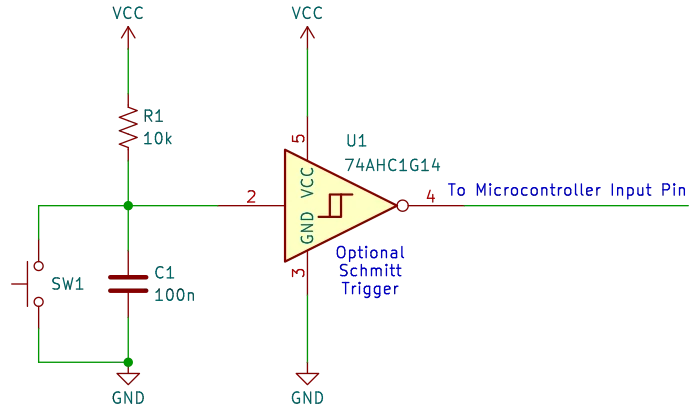
Arguably the above design is a bit crude, as when SW1 is closed, it directly shorts out capacitor C1. A better design is the circuit below. This circuit adds resistor R2 so that C1 is not directly shorted by switch SW1.
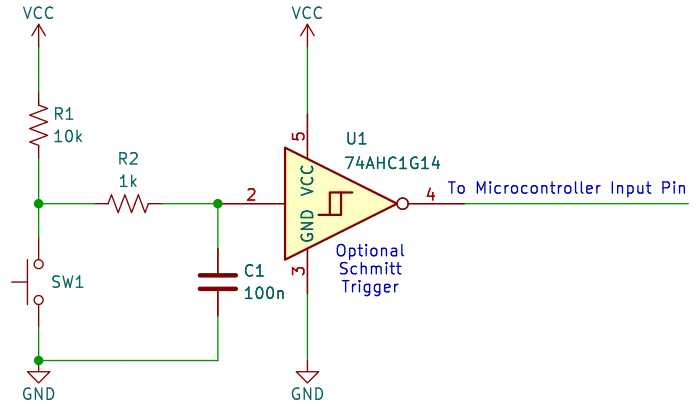
At power on with SW1 open, C1 is initially in a discharged state and pulls pin 2 of the Schmitt trigger to GND. C1 charges through resistors R1 and R2. When C1 is fully charged, pin 2 of the Schmitt trigger is held HIGH, at VCC by R1 and R2.
When SW1 is pushed closed, capacitor C1 discharges through resistor R2 at a certain rate. When the switch contacts bounce open, C1 starts to charge again through R1 and R2. When the switch contacts bounce closed, C1 starts to discharge through R2 again.
With the correct component values selected for R1, R2, and C1, the input of the Schmitt trigger will continue to see a HIGH logic level, until the switch contacts settle and the switch keeps the input pulled LOW.
Why Use a Schmitt Trigger?
An RC circuit causes the input voltage to change more slowly. A normal digital input may not behave predictably while its voltage is between the LOW and HIGH input thresholds. A Schmitt trigger solves this problem by providing hysteresis. It has different switching thresholds for rising and falling input voltages, producing a clean digital transition even when the input changes relatively slowly. A device such as the 74HC14 can therefore be used after an RC filter.
Many microcontrollers have input circuitry with characteristics that make an external Schmitt trigger unnecessary in ordinary applications, but the exact input behavior depends on the device. If the input is particularly noisy or the signal has a slow edge, a Schmitt trigger can provide a more predictable interface.
Specialized Debounce ICs
Specialized debounce ICs like the MAX6816 can handle debounce automatically, but are less commonly used in basic projects.
Software Debounce Techniques
When you want flexibility or don’t have space for extra components, software debounce is a great solution. It involves filtering out bounce in your firmware.
Delay-Based Switch Debounce (Simple)
After detecting a button press, add a short delay (e.g., 10ms) and check again.
Example in AVR C (polling-based):
if (!(PINB & (1 << PB0))) {
    _delay_ms(10);  // wait for bounce to settle
    if (!(PINB & (1 << PB0))) {
        // Confirmed button press
    }
}
This method is easy but blocks the CPU during the delay, which isn’t ideal in time-sensitive applications.
Timer-Based Switch Debounce (Non-blocking)
Use a timer to debounce the switch in a non-blocking way. This is ideal for real-time systems.
Steps:
- Detect the state change (rising/falling edge).
- Start a timer.
- After a timeout (e.g., 10ms), check if the state is stable.
- Only then register the press or release.
Example (pseudo-code for AVR):
ISR(PCINT0_vect) {
    // On pin change, start debounce timer
    debounce_timer = 0;
    debounce_pending = 1;
}

void check_debounce() {
    if (debounce_pending && debounce_timer >= 10) {
        if ((PINB & (1 << PB0)) == stable_state) {
            // Stable input after bounce
            handle_button_event();
        }
        debounce_pending = 0;
    }
}
Debouncing in Interrupt-Driven Systems
For embedded systems using interrupts to detect switch presses, debouncing becomes a bit trickier:
- Use a flag and timer inside the interrupt service routine (ISR).
- Disable further interrupts during the debounce period.
- Or ignore button events until the debounce time has passed.
This technique ensures minimal CPU usage while avoiding false triggers.
AVR Examples for Switch Debounce
AVR microcontrollers are perfect for experimenting with both hardware and software debounce.
Example: Debounce a Push Button on ATmega328P
- Pin: PB0
- Debounce delay: 10ms
- Method: Delay-based polling or Timer0 overflow
These techniques also apply to popular platforms like Arduino, which uses AVR chips under the hood. You can debounce push buttons with code or external RC filters, depending on your project’s complexity.
Best Practices for Reliable Button Debounce
- Use a combination of hardware and software debounce when possible.
- Always test your debounce logic with different types of buttons.
- Adjust debounce time for your specific application, don’t just copy values from tutorials.
- For mission-critical applications, prefer hardware debounce or firmware timer-based methods.
Frequently Asked Questions About Switch Debounce
What is switch bounce?
Switch bounce is the rapid series of unintended electrical transitions that can occur when the contacts inside a mechanical switch open or close. Instead of producing one clean transition from HIGH to LOW or LOW to HIGH, the switch may rapidly alternate between the two states for a few milliseconds.
A microcontroller can detect these rapid transitions as multiple button presses or releases. Switch debounce prevents these unwanted transitions from being interpreted as multiple input events.
Why do push buttons need to be debounced?
Push buttons need to be debounced because mechanical contacts do not always change state cleanly. When a button is pressed, the contacts can physically bounce before settling into their final position.
Without debounce, a single button press might be detected several times. This can cause problems such as a counter increasing by several counts, a menu advancing through multiple items, or an interrupt being triggered repeatedly.
How long does switch bounce usually last?
Switch bounce commonly lasts for a few milliseconds, although the actual duration varies considerably between switches. Some switches settle very quickly, while others can produce bouncing for 10ms or longer.
A debounce period of around 10ms is often a useful starting point for a microcontroller project, but it should not be treated as a universal value. Testing the actual switch with an oscilloscope or logic analyzer can help determine an appropriate debounce time.
What is the best way to debounce a push button?
There is no single best debounce method for every application. Hardware debounce using an RC filter is simple and can reduce unwanted transitions before they reach the microcontroller. Software debounce is more flexible and avoids the need for additional components.
For many microcontroller projects, timer-based software debounce is a good general-purpose solution because it does not block the CPU. Hardware and software debounce can also be combined when particularly reliable switch operation is required.
Is a 10ms debounce time enough?
A 10ms debounce time is often sufficient for many mechanical push buttons, but it is not guaranteed to work with every switch. The required time depends on the characteristics of the switch and the way the input is being detected.
If a switch still produces multiple events after 10ms, the debounce period can be increased. Conversely, using a much longer delay than necessary can make the button feel less responsive.
Does an RC circuit completely eliminate switch bounce?
An RC circuit can significantly reduce the rapid voltage changes caused by switch bounce, but it does not necessarily produce a perfectly clean digital signal on its own. The capacitor slows the voltage transition, and the resulting signal may spend some time between the logic LOW and HIGH thresholds.
A Schmitt trigger input can be used after the RC filter to convert the slowly changing signal into a clean digital transition. Many microcontrollers also have input circuitry with hysteresis, but the specific behavior depends on the microcontroller.
Can switch debounce be done entirely in software?
Yes. A microcontroller can debounce a switch without any external capacitor or other filtering components. The firmware can detect a change in the input, wait for a specified period, and then check whether the input has remained stable.
Software debounce can be implemented using a simple delay, a timer, periodic polling, or a state machine. Timer-based and state-machine approaches are particularly useful when the application must continue performing other tasks while the button is being debounced.
Why is a delay-based debounce sometimes a bad idea?
A simple delay is easy to understand and works well for basic applications, but a blocking delay prevents the processor from doing other work during the debounce period.
For example, if the firmware waits 10 ms using a blocking delay, other processing may be temporarily interrupted. This may not matter in a simple project, but it can cause problems in applications that need accurate timing, responsive communication, or real-time processing.
A timer-based debounce method avoids this problem by allowing the microcontroller to continue executing other code while the debounce interval is running.
Should a push button be debounced when using an interrupt?
Yes. An interrupt does not eliminate switch bounce. In fact, using an interrupt can make the problem more noticeable because each bounce transition may generate another interrupt.
A common approach is to use the first interrupt to record that a button event has occurred and start a debounce timer. Further button events are then ignored until the debounce interval has expired. The input can subsequently be checked to determine whether the button is genuinely in its new stable state.
Can switch bounce damage a microcontroller?
Normal switch bounce does not usually damage a microcontroller. The problem is that the rapid transitions can cause incorrect program operation, such as multiple interrupts or repeated button events.
The electrical design still needs appropriate protection against excessive voltage, current, electrical noise, and other conditions that could damage an input. Debouncing itself is primarily intended to improve the reliability of the input signal rather than protect the microcontroller from physical damage.
Do all switches need debounce?
Not necessarily. Mechanical switches and push buttons generally require some form of debounce because their contacts can bounce. Other types of inputs, such as electronic switches or some sensors, may not have the same mechanical contact problem.
The appropriate solution depends on the characteristics of the input device and how the microcontroller uses the signal. Even when a switch has relatively little bounce, testing the actual hardware is a good way to determine whether debounce is necessary.
Can I use both hardware and software debounce?
Yes. Hardware and software debounce can be used together. An RC circuit can reduce the rapid electrical transitions, while software can provide additional filtering and ensure that the firmware responds only to a stable input.
Using both techniques can be useful in applications where reliable button operation is particularly important. However, it also adds components and firmware complexity, so a combined approach is not always necessary for a simple project.
How can I test switch bounce?
An oscilloscope or logic analyzer can be used to observe the electrical signal produced by a switch. Connect the measurement instrument to the microcontroller input and monitor the signal while repeatedly pressing and releasing the button.
The resulting waveform can show how long the contacts take to settle and how many unwanted transitions occur. This information can then be used to select an appropriate hardware filter or software debounce interval rather than relying on an arbitrary value.
Does switch debounce apply to Arduino and AVR microcontrollers?
Yes. Switch debounce applies to Arduino boards and AVR microcontrollers in the same way it applies to other microcontroller-based systems. A mechanical button connected to an AVR input can generate multiple transitions from a single physical press.
Arduino and AVR projects can use either hardware debounce, software debounce, or a combination of both. The appropriate approach depends on whether the application uses polling, interrupts, timers, or other real-time functions.
Final Thoughts on Switch Debounce
Debouncing might seem like a small detail, but it’s vital for building reliable embedded systems. Whether you’re using AVRs, Arduino, or any other microcontroller, understanding switch bounce and mastering debounce techniques will make your designs more stable and user-friendly.
By implementing either a hardware debounce circuit or writing efficient software debounce routines, you’ll prevent those frustrating false presses and improve the overall performance of your embedded system.
Understanding this topic is a key step in becoming a confident embedded developer.
You may be interested in our article on how to choose the best AVR programmers.